Notes About Note-Taking
A few months ago, a colleague wrote about creating an online tutorial for Zotero instruction. After reading April’s post, I thought about my own experiences with citation management tools.
I was familiar with the citation managers used by faculty and students, but didn’t consistently use one myself until a year ago. Then, early in a group writing project, Zotero was suggested as a way to share literature and annotations.
This reintroduction came just in time to keep me on track for overlapping publication and presentation deadlines. Finding my notes on important points and their sources was much easier than sifting through file folders of stapled printouts (or an unwieldy stack of papers, not that any of us have experience with that).
Looking back, I think using a citation manager to organize my articles and thoughts helped me multitask a little more effectively. Zotero 6, the latest version, incorporates PDF features like exporting and storing annotations, as do other citation managers.
Tools like Zotero can be useful in other circumstances, too. For example, I’m participating in three reading circles/discussion groups this summer. I’m able to attend at least two meetings for each group, and didn’t want to lose track of what was next. Rather than printing everything, I created a Zotero folder for each group that includes the assigned PDFs and my notes. Before each group’s (virtual) meeting, I can quickly access my highlights for that session’s reading and refer to them during the discussion. I haven’t noticed a difference in what I’m retaining, and I’ve saved paper and office clutter.
Reading and annotating on a screen isn’t for everyone, of course. But if you’re thinking about giving your highlighter a break, choices range from mobile-friendly note-taking apps to research-focused platforms. Asking colleagues about their experiences and considering what’s used most at your institution can lead you to a few options to explore. If you’ve found an application that’s been a good fit for your citation and note management, please share it in the comments.
The important thing is finding (or continuing) a system that works for you — including tried-and-true post-its and paper stacks.
Presented by Steven Bell
July 14, 2022 at 11:30 am EST
This presentation introduces attendees to the Five Revolutions of Higher Education. It is less about predictions than surfacing societal trends that are already impacting and will continue to reshape how and to whom higher education is delivered. The five revolutions are:
* Demographic Revolution
* Socio-Cultural Revolution
* Economic Revolution
* Technological Revolution
* Learning Revolution
In 2020 we experienced a new and sixth revolution – the global COVID pandemic. We will reflect on how these revolutions are altering the higher education landscape, but more importantly, how, in 2022 and beyond they will support or detract from the efforts of academic librarians to create cultures of openness at their institutions.
Whether it is leading the way for open access journal publishing, supporting instructors to flip their courses to open educational resources or adopting open pedagogical methods, the open movement in higher education is a critical component of academic librarianship’s mission and significant contributor to its sustainability. Using these revolutions as a perceptive lens, Steven will encourage attendees to engage with academic openness and support its advancement in higher education.
Steven J. Bell, Ed.D., is the associate university librarian for research and instructional services at Temple University. He writes and speaks about academic librarianship and higher education, change readiness, educational technology, open education, design thinking and user experience. He currently teaches design thinking and open education courses to MLIS students at the San Jose State University iSchool. He authored two columns for Library Journal, “From the Bell Tower” and “Leading From the Library” from 2009 to 2019, and currently contributes a monthly blog post on academic library topics to the Charleston Hub. For additional information about Steven or links to his projects, visit his info page.
As a reminder, the Zoom link will be sent approximately 48 hours before the session. We will mute participants on entry into the Zoom room. Session will be recorded and available on YouTube after the session. We will enable Zoom’s Live Transcription feature during the session.
If you would like to present with C&CS, please contact the C&CS team.
This project is made possible by a grant from the Institute of Museum and Library Services as administered by the Pennsylvania Department of Education through the Office of Commonwealth Libraries, and the Commonwealth of Pennsylvania, Tom Wolf, Governor.
Support is also provided by the College and Research Division of the Pennsylvania Library Association.
Throwing a Research Party
At W&J, our library is part of the Academic Affairs department of the college. Also, in the Academic Affairs department is our Writing Center and the Peer-Assisted Learning (PAL) Tutors. This arrangement is somewhat new since our Writing Center is about to celebrate their 1-year anniversary and even though PAL Tutors have been on campus for awhile, until last year they were part of the Student Life department.
A few years back, I had read an article that introduced me to the concept of a research party and since I read that article I’ve been trying to make it happen in my library. Here’s a link to that article, Throwing a Research Party, Deconstructing the Reference Desk: Bringing a Social Component to Research by Jennifer Hunter & Christina Riehman-Murphy, if you’d like to read it: https://www.jstor.org/stable/90009948.
My attempts at throwing a research party were complicated by a library renovation and then a global pandemic but finally last fall I had my chance. A new coordinator of the First-Year Seminar (FYS) experience wanted to implement several sessions outside of class time and have FYS faculty encourage/require their students to attend a certain number of them. I had been working with our new Writing Center Coordinator and she was on board with doing a Research Party with me as a joint-session for the FYS cohort. We picked a date near midterm, decided to hold it in the library classroom, and wrote a blurb that pitched it as a one-stop-shop to have your questions about research & writing answered. At the last minute, I reached out to PAL tutoring to see if they wanted to join the party. They were unable to have tutors on hand but we were able to get information about their hours and subject coverage that we could share with attendees.
The night of the session, I along with two writing center tutors and the writing center coordinator, set up in the library with snacks and waited for people to start trickling in. What happened was that at 7pm, when our session began, about 30+ first-year students showed up ready to hear a presentation as that is what the previous sessions had been like. We pivoted and gave a quick presentation on the services that the writing center, the library, and PAL tutoring could provide. We had slides on repeat with the locations and hours for each support area and many students took pictures on their phone of the hours and ways to contact each center. Only a few students from the first group actually stuck around to ask questions. Our session was scheduled to be 2 hours long and, in that time, maybe 10 or 15 more students came through. In those smaller groups, even though the students didn’t come with a specific question, we were able to talk to them about their needs and several indicated that they would be making an appointment with the writing center in the future. So even though I think we failed at the concept of a research party, I think we succeeded at reaching a record number of students and helped to give the new writing center the exposure they needed to make students more aware of their existence.
We are doing another joint-session with the writing center and the PAL tutors this fall but we’ve pivoted from the concept of a research party to a scavenger hunt/trip around the world of academic support. Instead of a one-stop-shop, we’re going to create a passport and ask students to visit all three locations – the library, the writing center, and the tutoring lounge. At each stop they’ll get a short presentation on what types of services are provided and get their passport stamped. We’ll also try to have some candy or other treats to give away. The session is still happening near midterm so if students have a question we are encouraging them to go to that stop last so that they can stay there and work with someone who is on duty. If they don’t have a specific question at least they will know where each support service is located, recognize at least one person who works there, and hopefully be more likely to return when they do need help. I’m excited to see how this iteration of the workshop goes and I’m still looking for opportunities to throw a successful research party in the library.
Has anyone else collaborated with writing centers or tutors on their campus?
The latest issue of Pennsylvania Libraries: Research & Practice is now available at palrap.org
Articles include:
- In the PaLRaP Spotlight: Tanya Fischer, MEd, MSLIS (she/her)
- Customizing Summon for a Specific User Population: A Health Sciences Library’s Experience
- Noteworthy: News Briefs from PA Libraries
Bryan McGeary & Danielle Skaggs, Co-Editors
===========================================================================
Pennsylvania Libraries: Research & Practice (PaLRaP) is a peer-reviewed, open access journal, sponsored by the College and Research Division of the Pennsylvania Library Association. PaLRaP provides an opportunity for librarians in Pennsylvania to share their knowledge and experience with practicing librarians across Pennsylvania and beyond. The journal includes articles from all areas of librarianship, and from all types of libraries within Pennsylvania.
LMS and Library Database Integration
One constant in libraries is the fewer barriers you place between users and some resource the more users will take advantage of that resource. That’s why libraries use technologies like ip authentication, single sign on, and responsive websites to make our collections more convenient for our patrons.
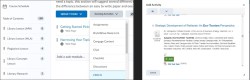
Another tool that’s available to libraries is using LTI integrations to make library databases available within a learning management system. LTI stands for Learning Tools Interoperability. LTI is an open standard that allows different pieces of software to communicate with a learning management system. The LTI standard is supported by all major LMS: Blackboard, D2L, Canvas, and many others. Using an LTI to integrate library databases into an LMS enables faculty to search those databases and quickly link to their resources within their online courses. For example, my Library has a subscription to Films on Demand, an online video streaming database, our integration of this database enables faculty to seamlessly embed videos into their online courses. Of course, there are other ways to do this, but for faculty uncomfortable using things like embed code, the LTI is a much better option. Since an LMS is already password protected, anything embedded using an LTI requires no login from students.
With online classes so common today the LMS has become “the college” as far as many students are concerned. The LMS is the digital campus through which students interact with everything that the university offers. As such, it’s a good idea for libraries to see that their services are as present in the LMS as possible. That could be a link to the library website or the ability for faculty to access library resources directly inside their course pages.
Most major database providers will have excellent documentation on how to setup an integration between their products and common learning management systems. The process can be easily completed in a few days in most cases. I highly recommend libraries explore this option.