Going Mobile with an iPad (or a Similar Tablet)
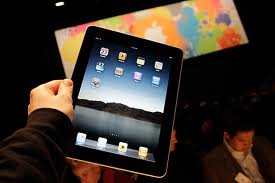
iPad Image by Brandon Hann_ledfrog.com
There have been numerous articles about mobile technologies and their use by librarians. This semester, I plan to put some of my reading into practice by using an iPad for mobile reference in a study center for non-traditional students. I thought it might be of interest to share a few sources on the subject of iPads and its uses for mobile librarianship. Certainly, other similar-type tablets could be used in much the same way. Please take a look a the brief list below of some of the sources I have collected and read.
- Setting Up a Library iPad Program: Guidelines for Success by Sara Q. Thompson
http://crln.acrl.org/content/72/4/212.full
- Using the iPad for reference services: Librarians go mobile by Megan Lotts and Stephanie Graves
http://crln.acrl.org/content/72/4/217.full.pdf+html
- Mobile Technologies for Libraries: A List of Mobile Applications and Resources for Development by Lori Barile
http://crln.acrl.org/content/72/4/222.full.pdf+html
- Ten Ways Your Library Could Use the iPad [Social Networking for Libraries]
http://socialnetworkinglibrarian.com/2010/02/24/10-ways-your-library-could-use-the-ipad/
- Piloting iPads in Library Settings [Not So Distant Future]
http://futura.edublogs.org/2010/09/05/piloting-ipads-in-library-settings/
- Why the iPad Changes Everything by Roy Tennant
http://blog.libraryjournal.com/tennantdigitallibraries/2010/08/06/why-the-ipad-changes-everything/
Has anyone used an iPad or a similar tablet as a mobile-reference/librarian tool? If so, would you care to share your thoughts/experiences? If you have not used such a tablet device for mobile library purposes, what do you think of the usefulness and practicality of the idea in your particular library setting?
Visioning a new CRD online journal

The CRD is moving along a path to start an online, open source, peer-reviewed journal. Why, when there are so many journals out there, are we considering starting yet one more? Well, we think there are several compelling reasons:
- Many academic librarians in the Commonwealth are doing really innovative and exciting things with their students (yes, I said “their students”), yet much of their work remains unknown and unpublicized. Yes, some librarians present at conferences, but their ideas often go no further than that conference. And many librarians do not, so their innovations may go no further than their workplace. As Megan Oakleaf stated at the CRD Spring Conference, we need to take seriously our responsibility to publish our research results in an indexed publication so that our colleagues can find and build on our research.
- Now that the PaLA Bulletin has changed its publishing schedule from 10 issues a year to 4 issues, there are fewer opportunities for academic librarians to publish in PA. We see a need for the CRD to provide a venue for publication, where conference proceedings, for example, can be published, as well as other articles.
- Although not all librarians need to publish to get tenure or be promoted, all librarians do need to make data-driven decisions. We rely on ‘the literature’ to find evidence on which we can base decisions or make recommendations to our administrators. So it’s imperative we share our research results with others, no matter how humble they may seem to us. Your little ‘knock-off’ survey might provide just the right tidbit of information another professional is looking for. You never know.
- The CRD recognizes the need to increase the value of a PaLA membership to academic librarians. While the CRD Board members are passionate about the need for collaboration among all librarians — public, school, special, and academic — we still realize that the academic workplace has different demands, namely that many academic librarians are required to demonstrate their service to the profession and to show evidence of scholarship. This may mean publishing or involvement on professional committees. We believe that offering PaLA-CRD members an opportunity to serve on an Editorial Board will add value by providing more opportunity for professional and scholarly work.
- Scholarly communication is changing. Numerous citation analyses have shown that when a publication is easy to find it is more likely to be used and cited by others. Sure, some tenure and promotion committees may still look askance at open source, online journals, but this is changing, and we can be a positive force contributing to this change. Yes, publishing involves a lot of time and energy, but it is work that strengthens our profession and helps us make headway collecting evidence of our value.
At this point, we think the journal should be ‘peer-invited’ rather than blind-reviewed, and we will begin by inviting selected PaLA Conference presenters to publish articles based on their presentations. (CRD conference proposals already have a 30-40% acceptance rate.) The editorial board, yet to be formed, will work with writers to develop articles for publication in an iterative, peer-review process. The journal will probably start as an annual publication and increase frequency as needed. We will seek to be indexed in LISTA, DOAJ, and other sources, too. Suggestions are welcome!
So, how can you help? The CRD Board wants to hear from you, your thoughts and reactions to the following questions. Your input will help us refine the concept before we send a formal proposal to the PaLA Council for approval. If you could give us your input by September 19th, it would be most appreciated. Tell us —
- Would you consider publishing in such a journal?
- If you are a CRD member, would you be interested in serving on the editorial board?
- If you’re not a member, would this be an incentive to become a member?
- Would you be willing to serve on an ad-hoc committee to research how best to begin?
- What do you like or not like about this idea? Any suggestions on how to avoid pitfalls, problems, etc?
- What should the journal be named?
Please comment! If you’d like to contact me directly, my email is lsn5383 (at) gmail (dot) com.
How does Your Library Leverage Social Media?
Have you implemented any social media at your library? I’m assuming many libraries have, based on conversations I’ve had and activity I’ve seen in this area. Some have been better at it than others. To implement social media successfully at your library, it is first important to understand what social media is. One of my favorite definitions comes from WebProNews:
Social Media is, at its most basic sense, a shift in how people discover, read, and share news and information and content. It’s a fusion of sociology and technology, tranforming monologue (one to many) into dialog (many to many.)
In order for that fusion to work well, a good plan or strategy must be developed. Two resources that I have found to be very helpful are:
- 30 Days to Social Media Success by Gail Z. Martin
- Doing Social Media So It Matters: A Librarian’s Guide by Laura Solomon
Once you’re up and running, you can start to do interesting things with social media to engage your students, faculty and staff. Need some ideas on how to leverage social media to create engaging interactions with your audience? Check out 40 Cool Ways College Libraries are Leveraging Social Media.
Please add to the conversation and share how your library is leveraging social media!
Positioning Your Library in the Mobile Ecosystem
The title of this post is also the title of a presentation given by Joe Murphy at a small professional development event hosted by LYRASIS in Philadelphia Last Week. Joe is a Librarian/Innovator who works at Yale University. He has made it his mission to keep up with the latest technology news, and to think about how these new technologies may impact the future of librarianship. His presentation can be found on his webpage http://joemurphylibraryfuture.com/ . According to Joe, the presentation “explore[ed] the current ecosystem of mobile information….[its] Focus [was] to learn how we can position and redesign the delivery of and interaction with content within the life flow of contemporary mobile consumers.” Personally I also found the presentation engaging and useful because it introduced me to several mobile applications and online tools that have been very excited to try this past week, tools, such as this online music application and a forthcoming book recommendation application that I will likely soon be unable to live without. His website also contains his blog where he reports on the latest technology news. This blog may be a useful link to add to your daily professional development reading, especially if you are having trouble keeping up with all the latest technology news out there. Let Joe do it for you!
However, while Joe’s presentation offered many neat tools and much information about the mobile environment, perhaps more useful for putting these mobile applications and trends into context for the library world is a story he referenced from a recent issue of Next Space, the OCLC newsletter. This article called Innovation Gaps: What’s keeping you from inventing the future focuses on identifying barriers to innovation (such as complacency, resources, bureaucracy) and then discussing how librarians can overcome these barriers to remain relevant in the future.
Election Results
I’m pleased to announce the results of the CRD election:
2012 Vice Chair/Chair Elect – Paul Process, New Media Librarian, Bucks County Community College
2012 Treasurer – Rebecca L. (Mugridge) MacIntosh, Head, Cataloging and Metadata Services, Penn State University Libraries
Congratulations Paul and Rebecca!


 Adam Balcziunas
 Alex K.
 Alexandrea Glenn
 Andrea Pritt
 aprilnkelley
 Ashley Purvis
 Bethann Rea
 blj13
blj13 Brendan Johnson
 Amanda Boyer
 Bret Stiffler
 Bonnie Powers
 Christopher Lemery
 clarewithers
 clblibrarian
 Kelly Clever
 Charlotte M. Johnson
 colemanluzerne
 CRD of PaLA
 crdvirtualjournalclub
 cre5314
 csgarth
 Erin B.
 danajkerrigancv
 denisewetzel1
 Darren G. Poley
 elm43
elm43 Heather Burychka
 James D'Annibale
 Annie Jansen
 Jill Hallam-Miller
 jennifercribbs
 Jenn Monnin
 Jen Hasse
 Jessica Showalter
 johnmeier1
 Julie Durci
 Kelly Safin
 Kim Karim
 Kristen Seikaly
 Kayla Van Osten
 Cecelia Lasley
 librarianjsmith
 Linda Neyer
 mabogino1
 Matthew McNelis
 Meg Massey
 Maggie Savidakis-Dunn
 Rebecca
 miskatoniclibrarian
 Maureen Bentz
 Michele G. Anfuso
 Nicole Miyashiro
 paulmcmonigle
 Rob Sieczkiewicz
 ronlmccoll
 Sam Bardarik
 shannahollich
 smartin592
 Ula Lechtenberg