Librarians On the Go!
As part of our outreach initiatives, we have offered roving reference services since 2012, stationing librarians in various locations such as computer labs on campus, study areas in other buildings, and high-traffic areas, such as the lobby of the student center. We also offer roving reference services at a campus building that is down the street from our main campus and houses our health sciences departments. Over three years, we’ve come to fine-tune our approaches to these services. We call the service Reference On-the-Go when we are aiming to assist students with research and library-related questions outside of the building, especially in study areas of other buildings and in computer labs. For this approach, one librarian usually goes to another campus location with a sign and an iPad and/or laptop, and this is more suited to places where studying and writing take place. We call it Pop-Up Library when we are in busy, high-traffic areas, such as the campus student center, and usually two library staff members (or a staff member and one of our student workers) attend, bringing library giveaways, an iPad and/or laptop, and sometimes coffee and donuts! This is more for general outreach and visibility and not as focused on reference or user instruction.
This year, we are trying to visit all of the campus buildings that house our various liaison departments, so each librarian has scheduled multiple one-hour time frames throughout October and November to visit the main department areas or the computer labs close to her liaison departments. We find that Reference On-the-Go has typically been more successful, drawing more reference and citation questions, in the building that is down the street from the main campus and the library, which seems to make sense! It’s a wonderful service for busy health sciences students who are a short drive (or a longer walk) away from the library; they can stop between classes at the cafe in the building to speak to their liaison librarian. The other buildings closer to the library on campus have had fewer occurrences of reference questions, but the program has still initiated conversation and interaction with students outside of the library, so we find it valuable nonetheless. We have also tried holding Reference On-the-Go in the Writing Center. It never hurts to remind students — wherever they are — that they can ask us questions and approach us for help.
There is a host of library literature on this topic; I’ve listed just a few articles below that have been helpful to me in the planning of these services:
- Lotts, M., & Graves, S. (2011). Using the iPad for reference services: Librarians go mobile. College & Research Libraries News, 72(4), 217-220.
- Kuchi, T., Mullen, L. B., & Tama-Bartels, S. (2004). Librarians without borders: Reaching out to students at a campus center. Reference & User Services Quarterly, 43(4), 310-317.
- Holmes, C., & Woznicki, L. (2010). Librarians at your doorstep: Roving reference at Towson University. College & Research Libraries News, 71(11), 582-585.
- Hines, S. S. (2007). Outpost reference: Meeting patrons on their own ground. PNLA Quarterly, 72(1), 12-13, 26.
Have you tried any versions of this type of outreach at your library and on your campus?
Connect & Communicate “Library Security Strategy” Presentation
Join CRD’s Connect & Communicate Series
for a Presentation on “Library Security Strategies”
Friday, October 30, 2015, 11:30AM-12:30PM EST
What is your library’s strategy for dealing with security threats on campus? Is it an effective one? Does it even have one? Can it afford not to have one? Nobody wants to consider that their library may be the target of a security threat. Preparing ourselves–making ourselves aware of our options–is our best line of defense in facing threats.
Please join us for a presentation by Scott R. DiMarco, Director of Library and Information Resources at Mansfield University of Pennsylvania, on library security strategies.
Register at the following link: http://goo.gl/forms/00BE5IGTXu
Registered participants will receive instructions for linking to the discussion via email on October 28th.
If you do not receive an email, please contact Jill Hallam-Miller at jbhm001@bucknell.edu
 For this program, you will need speakers or headphones to hear the presenter. Participants are encouraged to ask questions via the chatbox; moderators will monitor the chatbox and facilitate question and response at the end of the presentation.
If you would like to be emailed directly about other upcoming Connect & Communicate Series events, provide us with your name and email address here: http://goo.gl/4urXl
Please continue to share your ideas for programming topics, speakers, or formats with us! If you or someone you know is doing something great in Pennsylvania’s academic libraries, tell us about it!
The Connect & Communicate Series of online programming offered by the PaLA College & Research Division aims to help foster a community of academic librarians in Pennsylvania. Please contact Jill Hallam-Miller at jbhm001@bucknell.edu or at 570-577-2055 with questions.
Discovering Potemkin
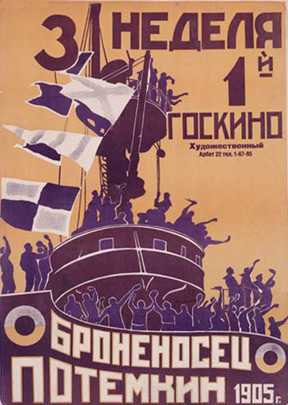
Original movie poster, Battleship Potemkin: Goskino Films
A few months ago, a faculty member contacted me about acquiring a copy of the 1925 silent film by Sergei Eistenstein, Battleship Potemkin. I was sure that we must have multiple copies of this classic film within Penn State’s vast library collection, and went to our single-search-box discovery layer (LionSearch), which is essentially Serials Solutions’ “Summon” product. I typed the following into the search box:
battleship potemkin
I did not even bother to use quotes, figuring that these two terms together were unique enough that the search would take me directly to what I needed. After all, the same search in Google provides me with the Wikipedia entry for the film as the first hit, and the Internet Movie Database (IMDB) as the second. My fourth result is a full-length version of the movie (which is in the public domain) on YouTube.
My results in LionSearch were not so helpful, despite the fact that they were sorted by “Relevance.” Here are my top five results:
- Taylor, Richard. The Battleship Potemkin: The Film Companion. 1 Vol. I.B. Tauris, 2000. KINOfiles Film Companions
- Marshall, Herbert. The Battleship Potemkin. Avon Books, 1978.
- The Battleship Potemkin. Faber and Faber, 1988.
- Eisenstein, Sergei. The Battleship Potemkin. Lorrimer Publishing Co, 1968.
- Higgins, Steven. “Battleship Potemkin.” Journal of Film Preservation.74-75 (2007): 131-2.
In case it’s not clear from this list, they are all books about the film Battleship Potemkin. The third and fourth in the list appear to be some sort of book versions of the movie, although it is not entirely clear. The final hit is a scholarly article about the DVD release of the movie. [Complete aside: I only recently learned about Proquest’s Flow citation manager, which we have integrated into LionSearch – it made my nice bibliography above in seconds!] The actual film was the eighth item on my results list.
When I narrowed my search by Content Type in LionSearch and selected “Video Recording,” I was presented with 18 results. This was more helpful – as I had suspected, we have multiple version and copies of this film throughout the system, including one on our own shelves (I knew I had seen it before!).
A few days later, I was looking for something else in Alexander Street Press’s “Silent Films Online” database, to which Penn State subscribes, and decided to look for Battleship Potemkin there. It turns out that we have access to two different streaming versions of the film, with transcripts. Returning to LionSearch, I realized that there is a Content Type facet for “Streaming” that is separate from “Video Recording.” That said, my original “Video Recording” limit did contain one video that I would consider to be streaming, that does not then appear in the actual “Streaming” list. Confused yet?
In any search system, it’s difficult to ascertain how things like relevance are determined. Google, for example, is not revealing too many secrets, but claims that relevancy is determined by over 200 factors. Penn State Libraries does provide some information about how LionSearch is configured. I am going to hazard a guess that in this particular case, the actual DVDs and streaming versions of Battleship Potemkin fell to the bottom of the search because they are “older” and deemed less relevant by the algorithm. And, of course, the way items are cataloged will have impact on which facets apply to them for narrowing searches.
I decided to try my search in the web version of WorldCat, since WorldCat does attempt to consolidate records and editions of items. WorldCat does assume that I want a visual resource, although my first result is for the VHS version of the film. The DVD is number 3, with that 1978 Herbert Marshall book showing up in second place. I can understand why the book is popular – even I finally succumbed and requested a copy so that I could learn how the famous Odessa Steps sequence was filmed. Obsessed, I retry the search at my former employer’s local instance of WorldCat. Herbert Marshall’s book is number 1, and the DVD is number 2, so even WorldCats don’t agree. This can probably be explained by the fact that the University of Maryland’s WorldCat instance allows items in their holdings to rise to the top of the search results.
I can’t stop. Amazon. Amazon understands. Not only does it know that I want a visual resource, but it sends me to a direct, free streaming link because I am a Prime subscriber. Indeed, a 2012 study by Rice Majors in Library Trends, “Comparative User Experiences of Next-Generation Catalogue Interfaces,” specifically points to Amazon’s “rich data of ratings, reviews, lists of similar items, the ability to search within the book, the ability to see front and back cover, the ability to read the first chapter, etc.,” as features highly desired by users. I would add “instant, intuitive and correct search results” to that list. Another article in the same issue of Library Trends, this time by Joshua Barton, goes further in explaining how sites like Google and Amazon can provide such positive user experiences based on their large supply of available aggregated data.
Does this mean LionSearch/Summon is terrible and Google is great? Does it mean that I am a terrible librarian? No, I don’t think so. Those conclusions cannot be reached from this minor experiment. What it does mean, however, is that when I attempt to teach undergraduates how to search I cannot tell them that there is one true way. Or even a “better” way. But I will not tell them that Google, Wikipedia, or Amazon are “bad.” Only different. And as a librarian, I should really pay more attention to how things are indexed, sorted, and results returned within different systems. There are things about the commercial sites that should make users wary. I’m certain Amazon is so pleasing to me is because it knows where I have been and many of my habits. Privacy is something that libraries value highly, but I honestly think that in the coming years, libraries will need to adapt in order to allow for the creation of custom user experiences, ability to anticipate user needs, leading to increased relevancy in search results.
Zotero for document management
Although I often suggest to students that they use the computer application Zotero specifically for citation management, I personally use it to manage and store all the documents that I create at work.
Besides citations, Zotero can save, store, and relate documents of any kind. When you create a record/citation in Zotero, you can attach the document to its record/citation by right-clicking the record/citation and choosing “Attach document>Attach stored copy of file”. Once you have attached the file, you can retrieve the file from Zotero’s storage space by double-clicking its record/citation.
So when I begin a new document at work…
1- I immediately create a record/citation for that document in Zotero;
2- I close and save the document in my “Downloads” folder;
3- I then right click the record/citation in Zotero and choose “Attach document>Attach stored copy of file” so that Zotero stores the document with the record within its system;
4- I click on the document record/citation in Zotero in order to reopen my document. [It is now safe to delete the document in the “Downloads” folder.]
Once a record has been created, you can add tags to it to associate it with subject terms. Zotero provides the user with a list of all subject headings used. And Zotero provides the user with the capability to associate the record with other records by using the “Related” tab.
Zotero also allows you to create your own file system, just as would in your computer’s file system.
If you forget where you put the document, Zotero provides a search box. But you can also sort the records by its various fields to find it by browsing through the sorted fields.
And Zotero automatically backs up all its records and their associated documents [you have to choose the option to include the associated documents] in a 2GB storage space that they provide free to all Zotero users. All the records and documents are then available to the user from the Zotero website, so it makes it easy to access your documents anywhere you find an internet browser.
The ACRL Information Literacy Framework and Assessing Threshold Concepts

I have a crush.
Since I have been engaging more with the 2015 ACRL Information Literacy Framework during the last few months, I have become enamored with the idea of “threshold concepts.” When I think of the word “threshold” I can’t help but conjure a mental image of a newlywed carrying a new life partner over a stoop or through a doorway to embark on their life together as a couple. Once the twosome crosses that plane, their intention is to go onward together with little thought of turning back or changing course, at least at that rapturous moment.
On a more serious note, ACRL’s “Introduction to the Framework” uses an explanation by Meyer, Land, and Baillie (2010) to describe what is meant by a threshold concept:
Threshold concepts are core or foundational concepts that, once grasped by
the learner, create new perspectives and ways of understanding a discipline
or challenging knowledge domain. Such concepts produce transformation within
the learner; without them, the learner does not acquire expertise in that field of
knowledge. Threshold concepts can be thought of as portals through which the
learner must pass to develop new perspectives and wider understanding.
(Meyer, Land, & Baillie as cited in ACRL, 2015, Introduction, Note 3)
Applying the more formal definition of a “threshold concept,” the newlyweds metaphor still works. Who, when united with one’s beloved, doesn’t hope to begin a shared, and thereby transformed, life experience together? In this unification, differing perspectives are likely to become more apparent, and ideally, respected, to create a greater understanding not just between the partners themselves, but of human relationships overall. Students who engage intentionally with information and its sources progress through the thresholds of the Framework and ultimately emerge as empowered participants in the larger world of scholarship.
The ACRL Framework’s statement is both powerful and challenging, just as beginning a new, shared relationship as a couple can be both wondrous and demanding. One particularly challenging aspect of utilizing the Framework and respecting the threshold concepts lies in assessment. How will we as librarians know whether or not students have traversed the identified thresholds into new levels of understanding? How can we determine if students will maintain intimate relationships with information and information sources beyond more of a “one-night stand” or “rush-to-the altar” demonstration of discrete skills? Yes, perhaps the students know they can search library databases for scholarly articles; they know how to critically evaluate information they find on the Web; maybe they know which types of sources are best for different types of information and can apply the lens of contextual levels of authority to make these judgments; and perhaps they can even create a project that includes effectively paraphrased or quoted information and has a correctly formatted Works Cited page at the end, but how do we determine that our students have incorporated these individual skills into a more comprehensive modus operandi?
As we get more deeply involved with planning instruction modeled on the Framework, I would argue that the threshold concepts are also calling us to a more longitudinal view of information literacy assessment. Taking individual snapshots of students’ performance of information literacy-identified tasks gives us a glimpse of their levels of information literacy, but this view is truly limited. To carry out effective assessment of students’ movement through the thresholds, we need to consider collecting student artifacts and data over the passage of time. We need to ask students to reflect on, and narrate their experiences with information seeking, making meaning, and knowledge creation. We need to be connected to how students work through information problems in their real lives and look for ways they are thinking critically and making decisions in those contexts. Librarians as embedded assessors using ethnographic approaches and involving students in more portfolio-type assessments, which require them to make choices about what they believe demonstrates their progress, are important methods to consider.
Of course, making these types of assessment a reality may make many of us feel like someone suffering from unrequited love. The obstacles to their implementation often seem insurmountable. I find this especially true for those of us working as librarians at community colleges. With program graduation/completion and successful transfer out rates somewhere in the range of 20% and below (Institute of Education Sciences, 2014)*, figuring out how to collect longitudinal data on a continuing cohort of students is definitely difficult. Even if we find a two-year program through which a group of students tends to move sequentially and steadily, we are left with a group that likely represents only a small, discipline-specific subset of our students. While collecting data on this group would potentially give us some information, we would still probably crave ways to gain a broader and fuller picture of where all our students are. Tracking the performance of students from one semester or year to the next and retaining assignments beyond students’ completion of the course for which it was originally submitted would require students’ permission. This could prove especially problematic in a community college setting where we often work with students for whom such practices might be greeted with suspicion due to their unfamiliarity. For those students who transfer from community colleges to four-year institutions, instead of losing track of these students, could we create on-going partnerships among librarians at both levels for a continued assessment of students’ progress? For non-transferring students, such as students who complete associate-level degrees and those who go from either a two-year or four-year school to the workforce, can we better use our institutional research departments, advancement offices/alumni organizations, and connections with companies that hire our students to help us assess their information literacy on authentic tasks outside the confines of course assignments?
These issues and questions deserve our attention. As we work through the trials and implications of solving them, we may just learn more about ourselves, our students, and our institutions. Who knows, we may find ourselves falling in love with information literacy and librarianship all over again.
*Data for Harrisburg Area Community College filed for Harrisburg Campus were used to inform this summary statement.
Image Credit: “Winter Wedding” by Fabrice Lambert available on Wikimedia Commons
References
Association of College & Research Libraries. (2015). “Introduction.” Framework for Information Literacy for Higher Education. Retrieved from http://www.ala.org/acrl/standards/ilframework
Institute of Education Sciences. (2014 Data). “Harrisburg Area Community College–Harrisburg.” College Navigator, National Center for Education Statistics. Retrieved from http://nces.ed.gov/collegenavigator/?id=21287803


 Adam Balcziunas
 Alex K.
 Alexandrea Glenn
 Andrea Pritt
 aprilnkelley
 Ashley Purvis
 Bethann Rea
 blj13
blj13 Brendan Johnson
 Amanda Boyer
 Bret Stiffler
 Bonnie Powers
 Christopher Lemery
 clarewithers
 clblibrarian
 Kelly Clever
 Charlotte M. Johnson
 colemanluzerne
 CRD of PaLA
 crdvirtualjournalclub
 cre5314
 csgarth
 Erin B.
 danajkerrigancv
 denisewetzel1
 Darren G. Poley
 elm43
elm43 James D'Annibale
 Annie Jansen
 Jill Hallam-Miller
 jennifercribbs
 Jenn Monnin
 Jen Hasse
 Jessica Showalter
 johnmeier1
 Kelly Safin
 Kim Karim
 Kristen Seikaly
 Kayla Van Osten
 Cecelia Lasley
 librarianjsmith
 Linda Neyer
 mabogino1
 Matthew McNelis
 Meg Massey
 Maggie Savidakis-Dunn
 Rebecca
 miskatoniclibrarian
 Maureen Bentz
 Michele G. Anfuso
 Nicole Miyashiro
 paulmcmonigle
 Rob Sieczkiewicz
 ronlmccoll
 Sam Bardarik
 shannahollich
 smartin592
 Ula Lechtenberg
 It's Academic