Learning to Write as an Academic Librarian

Like many library school graduates, I found myself landing a faculty position with no real experience in participating in scholarly writing and publication. This kind of scholarly output is expected as part of the promotion and advancement process for many librarians, so if I was going to succeed, I had to figure out how to write something other than a paper for class. In my case, I’ve been teaching myself how to write by working on a literature review for the past two years. This experience has been something of a lab course in “How Scholarly Writing Works.”
The idea had started out as an annotated bibliography of library storage literature–a way to help other storage practitioners easily find articles relevant to the issues they were trying to address. I was quickly informed that “LibGuides are not research” (which made me laugh). Never mind the fact that I had never actually written a formal annotated bibliography before, much less one that could possibly be formatted as an article. So as I read and took notes over the next several months, I pondered over what form this article would take—how I could make this annotated bibliography something that contributed not only practically to my colleagues, but intellectually to the field.
After some time had passed, and I had written most of an annotated bibliography, I came across a literature review article by a colleague and suddenly realized this was a genre of article that existed. It was the ideal format to put my ideas into, especially if I compared the themes I saw in the literature today to those I saw in another similar annotated bibliography written in 1994*. That meant, of course, that I had to start rewriting my article, actually synthesizing and making conclusions based on what I had read for so many months, and not just summarizing what I had read. I scanned through other lit reviews and imitated what I had seen there, discerning the patterns in how their arguments were laid out and how they were formatted.
I definitely made some mistakes along the way. For example, my literature collecting was embarrassingly unsystematic, and I didn’t keep track of how I was collecting articles. For a month or so, I dropped the “comparison to the 1994 article” angle because I was convinced I would have to essentially re-do the work already done in that other article in order to do my comparison any justice. Finally, even when I thought I was synthesizing, I was still summarizing and had to delete a lot of my work all over again.
Through constant trial and error, however, I am nearing the end of this project. I’ve ended up learning a lot—not just about writing literature review articles, but the scholarly writing process as a whole. For example, I wrote out a fake proposal that forced me to think structurally about what I was writing and why. I started keeping a notebook of my writing efforts: making lists of what sections still needed writing, which needed synthesis; journaling to organize my thoughts and impressions on what I was learning. I also benefited from receiving feedback from my colleagues by joining our library’s writing group.
In my experience, I found success taking on the challenge of teaching myself to write scholarship by imitation—pretending I knew I what I was doing—receiving feedback from more experienced colleagues, and then revising my process until finally I actually do know what I’m doing. Like any skill, it took experimentation and practice. And several rough drafts.
*O’Connor, P. (1994). Remote Storage Facilities: An Annotated Bibliography. Serials Review, 20(2), 17–26. https://doi.org/10.1016/0098-7913(94)90026-4
Cyber Security in Higher Education
As a follow-up to an earlier blog I wrote about cyber security (“Gone Phishing: Service Continuity after a Cyber Attack”), I would like to share information about an upcoming webinar, “Cyber Security in Higher Education,” sponsored by Scholarly Networks Security Initiative.
Scheduled for Thursday, October 14 at 2:00pm EST.
How can librarians and those in higher education contribute to the cyber security effort?
To register for the program, complete the form: https://us06web.zoom.us/webinar/register/WN_g3NGQLFeQsmfm5jOdnGtOQ
Summary:
This year’s annual cyber security summit will feature speakers talking about the general threat of security intrusions in higher education, the process of library participation in an institutional security audit, and advances in authentication technology. The overall theme of the summit is awareness and taking action. Librarians and network security professionals are welcome, as well as anyone with an interest in cyber security issues in higher education. A panel of responders chosen from among willing registrants to the event will comment on the presentation and ask questions. There will also be ample time for questions from the general audience. Register now!
Speakers:
 Daniel Ayala Managing Partner Secratic LLC Daniel Ayala (@buddhake) is the Managing Partner at Secratic (secratic.com), a strategic information security and privacy consultancy focused on helping companies protect data and information, and be prepared before incidents happen. Throughout his 25 year career, he has led security and privacy organisations in banking and financial services, pharmaceutical, information, higher education, research and library organisations around the world, and both writes and speaks regularly on the topics of security, privacy, data ethics, and compliance. Daniel is also the host of The Great Security Podcast (greatsecuritydebate.net) and the co-founder of Mentorcore (mentorcore.biz).
 Emily McElroy Dean of McGoogan Library University of Nebraska Medical Center Dean Emily McElroy joined UNMC in December 2013. Prior to coming to UNMC, McElroy served for six years as associate university librarian for content management and systems at Oregon Health and Science University (OHSU). Prior to OHSU, McElroy was head of library acquisitions at New York University. She also has held positions at the University of Oregon and Loyola University’s Health Sciences Library. McElroy graduated from DePaul University with a B.S. in history and from Dominican University Graduate School of Library and Information Science in Illinois with a master’s degree in library and information science in 1999. She is a nationally recognized speaker on the management of library resources. An active member of many professional organizations, McElroy has served on advisory boards for major publishers.
 Heather Flanagan Principal Spherical Cow Consulting Heather Flanagan, Principal at Spherical Cow Consulting and Technical Liaison for SeamlessAccess, comes from a position that the Internet is led by people, powered by words, and inspired by technology. She has been involved in leadership roles with some of the most technical, volunteer-driven organizations on the Internet, including IDPro as Principal Editor, the IETF, the IAB, and the IRTF as RFC Series Editor, ICANN as Technical Writer, and REFEDS as Coordinator, just to name a few. If there is work going on to develop new Internet standards, or discussions around the future of digital identity, she is interested in engaging in that work. You can learn more about her at: https://www.linkedin.com/in/hlflanagan/.
By Joshua Cohen
At Elizabethtown College, our library staff started brainstorming how to best gather, organize, and report information literacy assessment data during the summer of 2019. We were also looking for software that included a “guide on the side” style, split-screen tutorial to create some more interactive tutorial modules. At a library conference, earlier that spring, I’d heard some fellow instruction librarians talking about the usefulness of LibWizard software from Springshare to this end. After some preliminary research (a very helpful LibWizard product review in The Charleston Advisor from early 2016 compared it favorably to Google Forms), discussions with colleagues, and weighing various options, we moved forward with the purchase of the software (Kaletski). We hoped to use the software for gathering data in the form of surveys, quizzes, and tutorials which are all included in the Full LibWizard package (SpringShare). Prior to using LibWizard, we’d used a number of other software products, including Survey Monkey, Google Forms, and Microsoft Office Forms. We found that LibWizard was preferable to these other products for purposes of organizing, analyzing, and reporting IL data.
Prior to our purchase of LibWizard, there was no central location for our assessment data. Librarians created their own surveys using individual Google Drive or Microsoft Office 365 accounts. Library staff could also use a shared Google account to create surveys and quizzes in one universally accessible location. Google also allows users to place files into different folders which would theoretically make it easier to organize. However, even with folders, anyone with a Google Drive account knows that these accounts can be difficult to keep well-organized. Purchasing LibWizard seemed to solve this problem. All the surveys, quizzes and tutorials created with the product are viewable by all staff members and easy to identify. However, unlike with Google products, you cannot create folders in which to subdivide them, but after more than a year of using LibWizard, this hasn’t been a problem.
Our college does offer us free access to Word products like Office Forms so we could have used that software for quizzes or surveys, and while there are circumstances in which some librarians have found that it makes sense to use this software, there are significant advantages to using the LibWizard for any data that the library staff might wish to quickly and easily analyze for assessment purposes. For instance, I created surveys for first-year seminar students and instructors, and with the LibWizard software, I could easily pull statistics from these surveys, using filters like a time-range; then LibWizard automatically allows the user to generate bar graphs of these stats. Figure 1 shows a bar graph that I used as part of my Fall 2020 information literacy assessment report, and it took less than a minute to produce it within LibWizard.
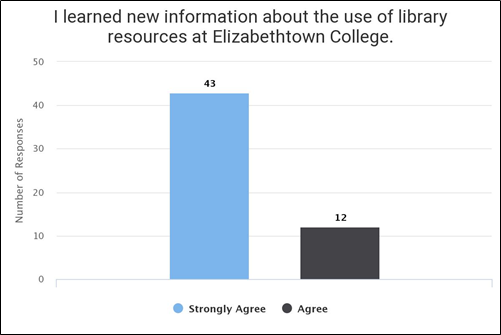
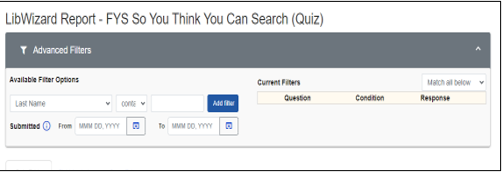
I have found that this is a real time-saver for writing assessment reports, and I have not found any way to easily analyze or organize my data with Google or Microsoft Forms. For instance, Microsoft Forms allows you to create very simple quizzes, and the software will automatically generate average scores for these quizzes, but if you’d like any additional data analysis, you would have to export your data into Excel and complete the analysis on your own through Excel, requiring a certain level of expertise with Excel. LibWizard automatically generates average and mean scores, shows you average scores for each question, and allows you to quickly and easily filter your results by dates or other criteria in the “Advanced Filter” settings, pictured in Figure 2.
As helpful as the simple and user-friendly Google and Microsoft products are, they do not offer any “guide-on-the-side” style tutorial option, and LibWizard does. There is one alternative that I found: free open-source software called Guide on the Side that was created by the University of Arizona Libraries; however, you need to have a Linux operating system to set it up and manage it independently–so that software was not an option for our library. I’ve set up a number of the LibWizard standalone tutorials, and while they have their limitations, they have been useful, and students haven’t reported any trouble completing them. The main flaw with the tutorials is that the split-screen viewing can be a challenge for the user to manage when the tutorial is matched up with a webpage like a database. However, I suspect that this flaw would likely be a challenge for any “guide-on-the-side” tutorial, and despite not working together perfectly, I’ve found that the tutorials work well enough with our databases.
I’ve spoken with librarians who have been disappointed that the quizzes and surveys created in LibWizard are not as visually attractive as those that you can create in Google Forms. I will acknowledge that Google Forms provides very easy-to-use and attractive layouts that you don’t have with LibWizard, but the minimalist design of LibWizard was satisfactory for our needs. If you have already used other Springshare products, then you will already be familiar with the layout of their products. Aesthetic design wasn’t a top priority for us when our library was evaluating the product. The central concern was over whether it would help us with our assessment needs, as well as providing us with the tutorial option, and it has successfully fulfilled both of those needs.
If you are looking for a software tool that will help your library staff to more easily organize and assess IL data, I don’t think you could go wrong with LibWizard. It does have a cost associated with it, but for our library, it’s been worth the cost, and I would recommend at least exploring the software to see if it also meets your library’s IL assessment data collection needs.
Joshua Cohen is the Instruction and Outreach Librarian at Elizabethtown College.
References
James, M. (2015). Guide on the side: READ ME file. GitHub, University of Arizona.
https://github.com/ualibraries/Guide-on-the-Side/blob/master/README.md#about
Kaletski, G. (2016). LibWizard. The Charleston Advisor, 18(1), 21-24.
Springshare. (2020) LibWizard. Springshare. https://springshare.com/libwizard/
CRD Virtual Journal Club Summer Wrap-Up
This past summer, the College & Research Division hosted a virtual journal club, which met online three times to discuss scholarship in the library science field. The CRD Journal Club was originally established in Summer 2018, and typically runs in the summer, spring, and fall of each year. The theme for the Summer 2021 semester was librarians’ collaboration with faculty.
For the first session, the participants read two articles: “The invertebrates scale of librarianship: Finding your niche,” by Samantha Dannick, published in College & Research Library News, and “From service role to partnership: Faculty voices on collaboration with librarians,” by Maria A. Perez-Stable, Judith M. Arnold, LuMarie F. Guth, and Patricia Fravel Vander Meer, published in portal: Libraries and the Academy. The group spent a lot of time discussing different types of collaboration, noting instances which seem to be more authentic partnerships and discussing when they felt like “jellyfish” librarians, as discussed in Dannick’s article.
The second session focused on discussing the article “Kill the one-shot: Using a collaborative rubric to liberate the librarian–instructor partnership” by Nora Belzowski and Mark Robison, published in the Journal of Library Administration. The discussion focused mostly around the rubric implemented by Belzowki and Robison in their article, and how it could positively impact their own instructional scheduling and practices.
For the third and final session, participants discussed the article “Library research sprints as a tool to engage faculty and promote collaboration,” by Jenny McBurney, Shanda L. Hunt, Mariya Gyendina, Sarah Jane Brown, Benjamin Wiggins, and Shane Nackerud, published in portal: Libraries and the Academy. The discussion around the research sprints as described in the article morphed into larger conversations on librarians’ relationship to faculty, as service providers and as colleagues, which can often be complicated by a librarian’s status on campus. Job expectations and the realities of what librarians can (and should) be asked to provide also came up through conversations and examples.
This series’ discussion offered advice for forming collaborative partnerships where both parties have equal benefits from the outcome, and provided different perspectives on barriers to collaboration across different institutions.
Look for our upcoming emails and let us know at crdvirtualjournalclub@gmail.com if you have any suggestions for topics/issues you would like to discuss!
Happy Frankenstein Day?

August 30th, apparently, is “Frankenstein Day.” No, it isn’t a national holiday. In the U.S. that would require a Presidential proclamation or an act of Congress. However according to holidayinsights.com in 1997 Ron MacCloskey from Westfield, New Jersey started naming someone “who has made a significant contribution to the promotion of Frankenstein” and awarding them “The Franky” on the last Friday of October, presumably given its proximity to Halloween. The reason August 30th is heralded as Frankenstein Day is because it is the anniversary date for the birthday of the writer Mary Shelley, the author of The Modern Prometheus, better known as Frankenstein.
While Mr. MacCloskey’s intent was to have a day, or rather a night for partying in celebration of the monster, the literati have transformed it into a cultural celebration of the author and her most famous work. A book which has been adapted and referenced in countless other books, movies, plays, and television shows, from parodies like Mel Brooks’ “Young Frankenstein” to the serious and thought-provoking opera which premiered in 2019.
Without knowing if “The Franky” is still a thing, in honor of Frankenstein Day I would like to nominate two Digital Humanities projects. First let me say both are listed in the Catalogue of Digital Editions, which gathers “digital editions and texts in an attempt to survey and identify best practice in the field of digital scholarly editing.”
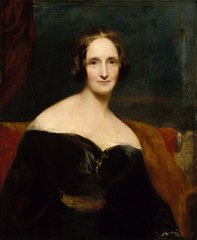
(1797-1851)
The one is an XML-TEI project at the University of Maryland completed in 2009. According to the catalogue’s philological statement, “Frankenstein” provides: “Complete information on the source of the text, the author, date and accuracy of the digital edition, as well as Digital Humanities standards implemented.” The other is “Frankenstein; or, the Modern Prometheus” which claims to be “The Pennsylvania Electronic Edition” edited by a professor at the University of Pennsylvania, and keyed with the help of many others. It has various editions of the novel and critical scholarly aids for the study of it. Both are Open Access resources which give one insight into the text and its author.
Happy Birthday, Mary Shelley!


 Adam Balcziunas
 Alex K.
 Alexandrea Glenn
 Andrea Pritt
 aprilnkelley
 Ashley Purvis
 Bethann Rea
 blj13
blj13 Brendan Johnson
 Amanda Boyer
 Bret Stiffler
 Bonnie Powers
 Christopher Lemery
 clarewithers
 clblibrarian
 Kelly Clever
 Charlotte M. Johnson
 colemanluzerne
 CRD of PaLA
 crdvirtualjournalclub
 cre5314
 csgarth
 Erin B.
 danajkerrigancv
 denisewetzel1
 Darren G. Poley
 elm43
elm43 James D'Annibale
 Annie Jansen
 Jill Hallam-Miller
 jennifercribbs
 Jenn Monnin
 Jen Hasse
 Jessica Showalter
 johnmeier1
 Kelly Safin
 Kim Karim
 Kristen Seikaly
 Kayla Van Osten
 Cecelia Lasley
 librarianjsmith
 Linda Neyer
 mabogino1
 Matthew McNelis
 Meg Massey
 Maggie Savidakis-Dunn
 Rebecca
 miskatoniclibrarian
 Maureen Bentz
 Michele G. Anfuso
 Nicole Miyashiro
 paulmcmonigle
 Rob Sieczkiewicz
 ronlmccoll
 Sam Bardarik
 shannahollich
 smartin592
 Ula Lechtenberg
 It's Academic