Making Local History Come Alive
As a Humanities Liaison Librarian, I have tried to make students more aware of resources in our area. With students here from all over the world, I hope that they will use their time on our campus not only to make use of on-campus learning opportunities, but also to get a taste of the local culture.
For example, the eastern part of our state is well-known for its importance during the American Revolution, but growing up in Western Pennsylvania, I was much more aware of the historical sites from the French and Indian War. Also known as the Seven Year’s War or the War For Empire, it is hard to imagine how different the history of our country might have been if the British had lost this war.
Within driving distance of our campus are Fort Ligonier, Fort Necessity, Fort Bedford, Fort Pitt, Bushy Run Battlefield, Forbes Road, and Braddock’s Road (which was fascinating to me as a child because General Braddock had been buried in the middle of it).
History students could visit all of these sites in a long weekend or learn more about them at the following websites:
French and Indian War in Pennsylvania – http://explorepahistory.com/story.php?storyId=1-9-6
Braddock’s Road – http://www.braddockroadpa.org/
Bushy Run Battlefield – http://bushyrunbattlefield.com/
Forbes Road – http://www.warforempire.org/visit/forbes_trail.aspx
Fort Bedford – http://www.fortbedfordmuseum.org/
Fort Ligonier – http://fortligonier.org/
Fort Necessity – http://www.nps.gov/fone/index.htm
Fort Pitt – http://www.heinzhistorycenter.org/fort-pitt/
For anyone who might be interested, the 252nd Anniversary of the Battle of Bushy run will be commemorated this weekend, August 1 and 2 2015.
How social is your social media?
For the past eight years, I have helped or solely managed public, special academic, and four year academic social media page(s) primarily using the Facebook platform. If your institution has not engaged in the social media realm or even if you have been working with one for years, I think that every social media manager can admit that with the constant, fast changing nature of social media, it can be helpful to gain any assistance and insight into strategies for connecting, posting, and beyond. As such, I recently attended a Skill Path seminar in Pittsburgh, PA titled Social Media Marketing. Even though the content was geared towards businesses, the basic ideals resonate with any industry.
The initial thought provoking question from the presenters was how social or fun is your social media? It was an ‘ah-ha’ moment for me as the presenters asked ‘why do you personally use social media?’ Do you want to look at generic advertisements plastered in your news feeds? With Facebook’s new customizable feeds, it is possible that people that have ‘liked’ your page never see your postings. My heart sank when I thought of all the postings I had created that did not utilize videos or pictures and were primarily textual micro-commercials about the library (i.e. services, collections, building news and events). I am rarely interactive and social in nature. As the seminar presenter suggested — give them something that they haven’t seen or a purple cow. (If interested in a purple cow example, ask me about the funeral home story below).
What is the best way to approach creating a social, social media campaign? With this question at hand, the presenters emphasized the importance of not just a social media policy (best to post one online for legal purposes) but an overall strategy the might change and revise based on different campaigns. Admittedly the idea of campaigns is a marketing term that I had not fully transferred to the management of library specific social media management.
What is the first step of any successful campaign? The presenters suggested creating a persona of one customer you want to target. In regards to academic libraries, I would probably target different services such as information about course reserves to freshman students versus finals week de-stress events to upperclassman in majors with especially stressful finals. I have noticed that this similar strategy is helpful when planning events in the library and partnering with a club or class can improve attendance. As such, I plan to reach out to these audiences via social media more directly in the future including posting on their feeds or direct messaging and asking the manager to post on their page(s). In the social media realm, typically it is a give and take relationships and if you post or retweet for me, I will do the same for you in the future.
While successful social media strategies are not created overnight, managing expectations by not overselling or setting the bar too high can lead to disappointment. Begin small and look for ways to enter into the conversation, for instance, recently a Twitter post mentioned that it would be awesome if colleges offered a buy one get one free semester coupon. I responded that academic libraries do offer free downloads of thousands of e-books, journals articles, and more- no coupon required. They proceeded to retweet and favorite this response creating important interactions and building relationships.
While we can never know everything about social media, academic libraries can create strategies for marketing every aspect of libraries’ via these platforms. In the meantime, I am thinking about ways to add more ‘social’ into postings and offering more interactive features, pictures, and videos. For instance, I am thinking about a behind the scenes, day in the life of a library student worker via videos and images or as a fellow colleagues mentioned a ‘behind the stacks’ campaign. I am curious to see how many library student workers know about the library social media pages and hope to gain more followers. I am also considering a contest among the student workers to help boost followers and likes.
Other interactive postings including pictures and videos ideas:
- create hashtags for specific courses and offer virtual reference
- reference referral videos or pictures and text
- regular researcher features
- pack the library Greek event hashtag supporting research rescue
- lost in the stacks assistance via Twitter direct message
- feature study group successes
- stacks pictorial scavenger hunts
- Twitter Bingo
- Social Media Scrabble
- interview students using the display windows in the library
- create short videos on students tabling in the library
Interested in continuing this conversation or brainstorming more ideas, please comment below or email csiroch@iup.edu. Skill Path offers other leadership seminars around the state of Pennsylvania on a variety of topics. The reference books related to the social media conference can be found here.
Adventures in 3D Printing

There have been a few posts in this space already about 3D printing and the MakerSpace concept. I mentioned in The Library of Now that our campus has a strong science focus, and as such, I have felt the need to delve more deeply into understanding the nuances of certain technologies.
Our first 3D printer, a Micro3D by PrintM3D arrived two weeks ago. Originally funded as a Kickstarter campaign, it is billed as the “first truly consumer 3D printer.” Visually, it is beautiful in the style of most Apple products: streamlined, bright (ours is blue), compact, quiet. At a list price of $349, the Micro3D is within reach for many people. It seems like the perfect gateway device.
I don’t intend to write an advertisement for the Micro3D. Rather, I want to discuss some of the challenges we have encountered using it. An Engineering instructor on our campus, experienced with 3D printing, told us it takes about a month to figure out the quirks of any printer, and I would have to agree. Since neither I nor my colleague had experience with 3D printers, it has been a steep learning curve. The Micro3D has what seems like a convenient compartment underneath its print bed for loading spools of 3D printer filament, not unlike traditional sewing machines load bobbins. However, we never successfully managed to thread the plastic filament correctly in this way. The “external” load option, which involves a much simpler process of inserting filament into the print head from the top, worked much better for us. Therefore, our first practical 3D printed item (we printed a cute owl first) was a bracket that someone else had designed specifically for hanging a spool of filament on the outside of the Micro3D. We also successfully created an intricate box from a design we found online, to hold some of our smaller loan items.
The printer is currently running with a laptop on our circulation desk and has garnered a lot of attention (some printers require a computer USB connection, others operate entirely independently). One of the most commonly asked questions is “Where do you get the designs?” The most common and well-known repository for 3-dimensional design files is Thingiverse, although using Google can also yield relevant results. A number of free, online tools exist to create your own designs. I prefer TinkerCad, which is like an extremely simplified version of AutoCad. Tinkercad is free to use, and allows for import of existing objects for modification. Others have recommended SolidWorks, although I have not tried to use it yet.
The fine nuances of 3D printing are many, and we are keeping a log of what has succeeded and what has not. We printed the box at the lowest resolution and settings, and it still took over eight hours to print (the software predicted 5). That said, it is the most structurally sound piece we have created. Some two piece designs did not fit together as promised. Some designs need “rafts,” or bases, and others do not. Some work better printing vertically and some horizontally. Items may stick to the print bed – a friend loaned us a bottle of Aquanet, which when sprayed on the bed, is an excellent lubricant. Right now, it is trial and error. I find myself frustrated by what I do not know about design, mechanics, and engineering. My list of things I want to create is long, but I currently lack the skills to adapt or create designs correctly for my own use.
As we have taken advantage of the quiet summer to get to know our printer, we have started to think about how we might present it to the public as a service. This is nothing special or new, a number of libraries have developed policies and procedures for 3D printing and worked out schedules and pricing. For now, we will offer any 3D printing in the library free-of-charge. The filament is inexpensive, and anything that would use a significant amount of it would take days to print.
In my attempt to develop language for some sort of policy for our 3D printing, I read the American Library Association’s “Tip Sheet” Progress in the Making: An Introduction to 3D Printing and Public Policy (2014). It is a document that I do not find useful and am curious to hear other peoples’ reactions. Two pages are devoted to copyright, trademark infringement, and licensing. There is the usual mention of the ease with which people could 3D print a gun or a sex toy. While it is always useful to consider copyright and licensing, the alarmist nature of this conversation saps away any enthusiasm I might have as a user to borrow another person’s freely-available design and modify it for my own use.
When addressing the role of libraries as 3D printing increases in popularity, the document states, “Given the many policy questions 3D printing gives rise to, libraries will need to do more than provide their patrons with instruction in the basics of printer mechanics and CAD modeling and scanning.” I am a pretty technology-savvy person, but the complexities of modeling something in 3D rather than 2D is something that is not coming easy to me. Even in a program as simple as TinkerCad, the concept of objects resting on different planes, negative space versus positive space, and dimensions are all requiring me to use new parts of my brain. Is this ALA document an attempt to calm or appease librarians who do not feel competent with technology that they won’t really have to learn it, that the most useful thing they can really do for their patrons is to write policies and follow them around lecturing about risks?
On the last page are three tips for library professionals, and this section is perhaps the most frustrating to me. The first thing a librarian should do, apparently, is to familiarize ourselves with the basics of patent and trade dress law? Second, we should develop a policy addressing legal risks, while still encouraging people to have fun! To me, this is like encouraging children to play outside in the summer, but not before warning about ticks, ample application of bug spray and SPF50 sunscreen, and insisting on dressing in long sleeves, socks, and shoes. But go have fun!
I cannot claim to be an expert on 3D printing. I have used one (although I hope to build my own and use more this fall). But I have observed other libraries purchase 3D printers and employ the technology. My tip sheet would focus first on the logistics and on the technology. What are the different kinds of plastics? Which printers are the fastest? What types of objects will print well at a low-resolution? How can I create my own design? How can I modify another person’s design? What do I need to know about Creative Commons and licensing of designs? What do I do if an object sticks to the print bed? How can 3D printers be used in education? In 2014, Educause released Making It Real, 3D-Printing as a Library Service. This, to me, is a much more complete and useful analysis than the ALA Tip Sheet, and provides some data and a case study about one academic library’s successful 3D printing program.
The ALA Tip Sheet does make a third recommendation: “Communicate with other libraries offering 3D printing services. Share your user policy and discuss emerging applications of your 3D printer(s) with others in the field.” And so I am.
Lend a Hand
In my last post…”Ready, Set Fail!”…I discussed the idea that building a ‘making’ component into your library’s services/programs could seem daunting and fiscally difficult, but that even baby steps toward creating an atmosphere of collaborative creation could yield surprising results. In response to this idea I have heard from a few of our readers and their stories of triumph (YAY! GA Tech for using ‘making’ as a common platform for art/design majors to blend with Engineering students and afford each a fuller perspective for their efforts), but last I was blown away by a group from
e-Nable showing how we can put this technology and spirit of making to good use.
Beginning as a collaboration between a prop-maker and a carpenter from South Africa to provide a prosthetic for a small boy (watch the YouTube video HERE), e-Nable is a non-profit organization consisting of a growing community of designers, fabricators and volunteers focused on using the Maker movement and its associated technologies to craft and share low-cost prosthetic limbs for children in need globally. This FANTASTIC idea provides not only a purposeful platform for demonstrating a wider array of uses for 3D printers and maker-devices, but allows those blessed with access and ability to leverage their time for an incredibly worthwhile pursuit.
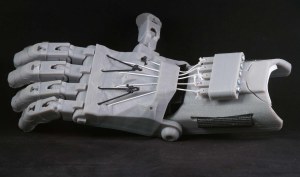
Anyone interested in volunteering their time, energy or Maker resources are able to get started by visiting http://enablingthefuture.org/ or joining their Google+ Community.
We all work very hard every day for the betterment of our students and patrons. Let’s pitch in here to help THEM make a difference while they learn!
I’ve danced around writing about this topic for a while now since it’s still so new to me (and maybe to many of us!), but I’d love to talk about the new ACRL Framework for Information Literacy for Higher Education. I learned about perspectives on the Framework at the ACRL conference in March and heard some ways in which librarians are using the new frames to work with their faculty and students. Some choose to map the new frames to the Information Literacy Competency Standards for Higher Education, while others prefer to take the Framework as a brand-new, separate entity. Many map the new frames to previously existing curricula, assignments, lessons, and other materials, which were sometimes built on the old standards but can now be interpreted with the new frames as well. In short, we all seem to be working with it in many different ways, and hearing directly from other librarians about how they are interpreting and using the Framework seems to be one of the most useful steps in this process. The ACRL even includes in its Appendix 1 to the Framework the first two suggested steps: (1) Read and reflect on the entire Framework document. and (2) Convene or join a group of librarians to discuss the implications of this approach to information literacy for your institution.
As Adam Balcziunas discussed in his May 22nd post about the Framework, at the Northeast Chapter’s workshop on June 5th, we had an unconference session about the Framework. If you haven’t been to an unconference, they are sessions in which the participants generally determine the topics that will be discussed, and they are driven by discussion and conversation. In this session, our 21 participants formed three groups, each group addressing a specific topic related to the Framework. The two facilitators rotated around to all of the groups to hear and contribute to the conversations, and the large group came back together to report to everyone on their main discussion points. We had a fantastic group of librarians and support staff who were eager to share their thoughts and experiences regarding the Framework with each other and with our group as a whole.
Here are the three topics the groups focused on:
- How does the Framework describe the work we are already doing and help us to talk about it in a different way (or redesign it)?
- How do we introduce faculty to the new Framework, and how do we discuss it with them?
- How do we use the frames to develop instructional sessions or activities?
In a few brief descriptions, here are just a few of the main points that came of the discussions:
- Applying the Framework does not necessarily require a complete overhaul of established work. Frequently, the learning objectives of an established lesson, course, or assignment can be connected with the new frames, and sometimes with more than one Framework concept. Similarly, the frames can also be mapped to the syllabus of a class or to the overall curriculum and/or institutional goals.
- Introduce the Framework to faculty as a tool that explains what they already want their students to achieve, but the language of the Framework offers a chance to re-emphasize, refocus, and clearly define their goals. Successful work with at least one faculty member regarding the use of the Framework can lead to more faculty involvement; use your faculty success stories in outreach.
- As the Framework itself describes a process of creation, exploration, and conversation, more hands-on opportunities in the classroom seem necessary. Projects can include ideas such as having students create and comment on a portfolio of their own scholarship over the course of a semester. The Framework intentionally does not describe a sequence of steps, so the frames can be applied in any way that is best for the intentions of the instructor or lesson.
Are you working with groups of librarians, faculty, and/or other staff to discuss the Framework and how it can be implemented at your institution? What are some of your favorite ways to think about and implement the Framework?


 Adam Balcziunas
 Alex K.
 Alexandrea Glenn
 Andrea Pritt
 aprilnkelley
 Ashley Purvis
 Bethann Rea
 blj13
blj13 Brendan Johnson
 Amanda Boyer
 Bret Stiffler
 Bonnie Powers
 Christopher Lemery
 clarewithers
 clblibrarian
 Kelly Clever
 Charlotte M. Johnson
 colemanluzerne
 CRD of PaLA
 crdvirtualjournalclub
 cre5314
 csgarth
 Erin B.
 danajkerrigancv
 denisewetzel1
 Darren G. Poley
 elm43
elm43 James D'Annibale
 Annie Jansen
 Jill Hallam-Miller
 jennifercribbs
 Jenn Monnin
 Jen Hasse
 Jessica Showalter
 johnmeier1
 Kelly Safin
 Kim Karim
 Kristen Seikaly
 Kayla Van Osten
 Cecelia Lasley
 librarianjsmith
 Linda Neyer
 mabogino1
 Matthew McNelis
 Meg Massey
 Maggie Savidakis-Dunn
 Rebecca
 miskatoniclibrarian
 Maureen Bentz
 Michele G. Anfuso
 Nicole Miyashiro
 paulmcmonigle
 Rob Sieczkiewicz
 ronlmccoll
 Sam Bardarik
 shannahollich
 smartin592
 Ula Lechtenberg
 It's Academic